To animate an image in ChatGPT, attach it, say what should move and what the camera does, and Idea to Wow renders it with the video model you pick, such as Seedance 2.5, Seedance 2.0 or Gemini Omni Flash. Your image becomes the first frame of a 5-second clip, from 30 credits ($0.30) at 720p. To control where the motion ends, attach a second image as the last frame, and the video model fills in the movement between the two.
BringOne still image you like and the motion you want
CreateA 5-second video clip that starts on your exact image
What does an animated image look like?
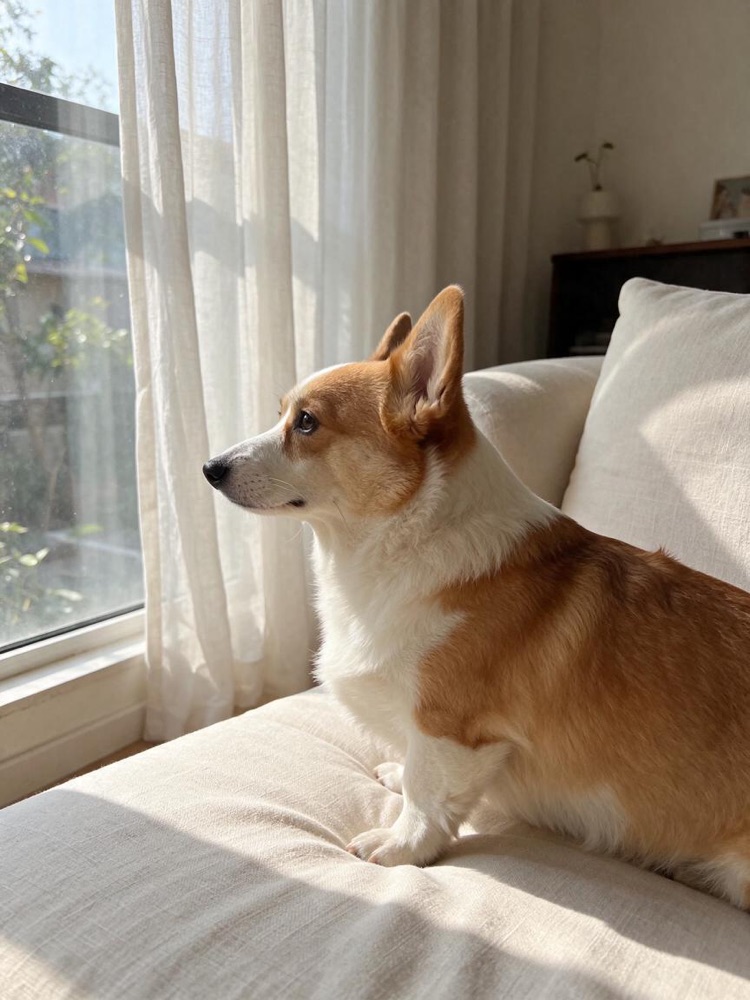
It is easiest to animate an image that already holds the moment: a subject that can move, room for the camera and nothing that must stay pixel-perfect. Below we animate an image of a corgi from a first and a last frame and an image of a lake from one frame, plus a product image and the motion we would ask for.
Pet: first and last frame
5 seconds at 1080p, 30 credits.
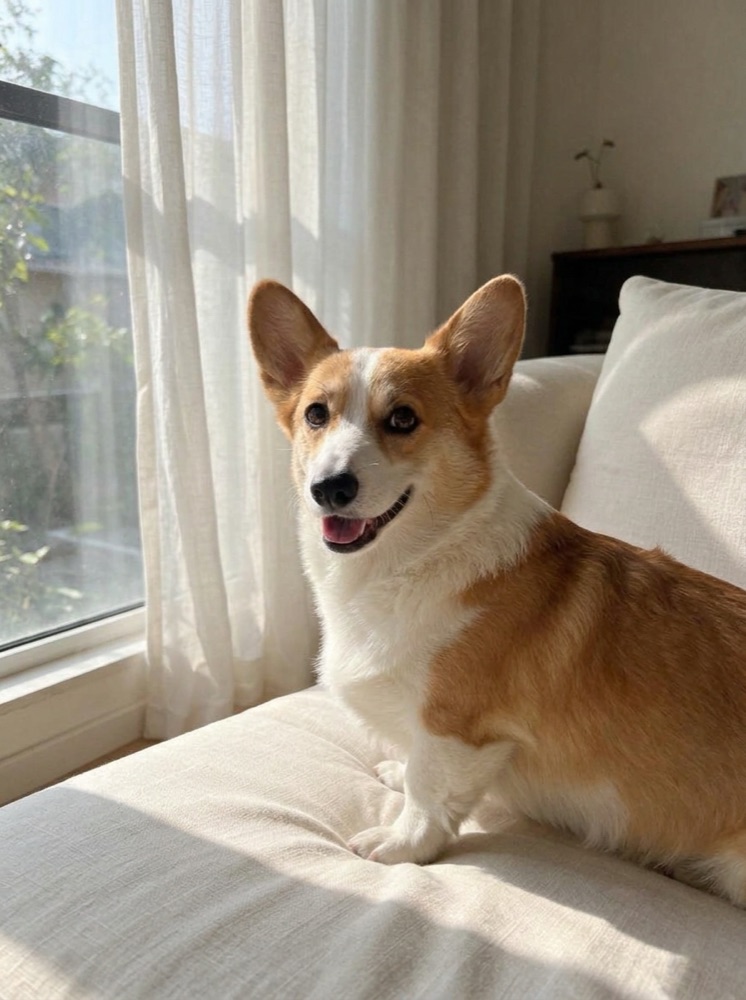
The corgi slowly turns its head from the window toward the camera and pricks up its ears. The curtains sway a little in a light breeze, soft morning light, the camera stays still. The clip ends exactly on the last frame image. Quiet room sound, no music, no text.
Pet: the last frame we attached
Use this as the last frame and the image before it as the first frame, so the clip ends exactly on the corgi facing the camera.
Landscape
5 seconds at 1080p, 30 credits.
Animate this image: mist drifts slowly across the alpine lake, the small boat rocks gently on the water, slow push-in toward the mountains. Keep the reflections calm and the scene unchanged. Soft sound of water and distant birds, no music, no text.
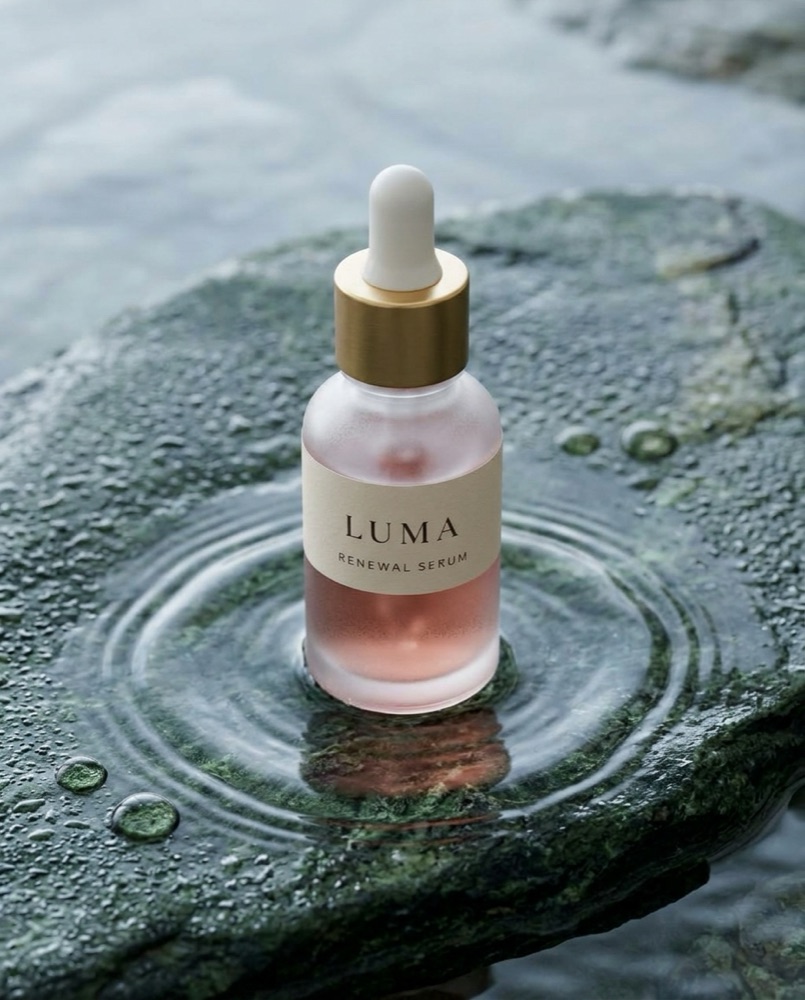
Product
Animate this image: the water ripples outward from the bottle, light glints across the glass, the bottle itself does not move.
The corgi and lake images were made with Seedream 5.5 and the corgi’s last frame with Nano Banana 2 on November 21, 2026; the product image comes from the product photos guide. Both clips were made from them with Gemini Omni Flash at 1080p on November 22, 2026, 30 credits each, and the sound is what the model made with the picture. The product image is shown as the still you would attach.
How do I animate an image in ChatGPT, step by step?
01Attach the source image
Use the final version of the image: right crop, right colors, no watermark. The video starts on this exact image, so fix it before you animate it, not after.
02Describe the motion you can see
Say what moves, how far and how fast, and what the camera does: "the dog turns its head toward the camera, slow push-in". Name what must stay still, such as a logo or a face, and leave out abstract words like "cinematic energy".
03Pick a model and check the cost
Ask ChatGPT which model fits the image and what the clip will cost. Gemini Omni Flash (30 credits per 5 seconds) is good for a first try; Seedance 2.0 (178) and Seedance 2.5 (270) keep faces and products steadier.
04Add a last frame when the ending matters
If the clip must land on a precise pose or layout, attach a second image as the last frame. The corgi clip above was made from a first and a last frame this way, and Seedance 2.0 and Seedance 2.5 take both too. A last frame made with Nano Banana 2 from your first image costs 3 credits.
05Generate once and inspect it
Watch the whole clip, then change one thing at a time: slower motion, a shorter camera move, another model. Each re-render is billed like the first one.
What should I ask ChatGPT to animate an image?
Copy this request, attach your image and replace the motion with your own. One sentence about the subject and one about the camera is usually enough.
Use Idea to Wow to animate the image I attach into a 5-second video. Use my image as the exact first frame. Motion: [what moves, how far, how fast]. Camera: [still, slow push-in or slow pan]. Keep [the face, the logo or the product] unchanged. Suggest the best model for this image, tell me the credit cost and wait for my OK before rendering.
How much does it cost to animate an image in ChatGPT?
You pay per clip with credits. 100 free credits cover 3 five-second clips on Gemini Omni Flash.
5-second clip, Gemini Omni Flash (720p)30 credits · $0.30
5-second clip, Seedance 2.0 Mini (720p)49 credits · $0.49
A last frame made with Nano Banana 23 credits · $0.03
Draft price list, checked November 21, 2026. Longer clips and higher resolutions cost more; ask ChatGPT for the exact price before you render.
Which model is best for animating an image?
For a quick test, start low and move up: Gemini Omni Flash or Seedance 2.0 Mini to see if the motion idea works, then Seedance 2.0 or Seedance 2.5 for the version you publish. The best model depends on the image as much as on the motion.
ModelBest forPrice
Gemini Omni FlashGoogle’s fast all-round video model with sound: good default for short clips from a prompt or a start frame.30 credits 5 s at 720p · $0.30
Seedance 2.0 MiniThe cheapest Seedance: fine for drafts, previews and voice- or audio-led clips.49 credits 5 s at 720p · $0.49
Seedance 2.0Cinematic video with sound from text, a first and last frame, or up to 9 images, 3 videos and 3 audio references.178 credits 5 s at 720p · $1.78
Seedance 2.5ByteDance’s premium video model for polished, cinematic work; clips up to 30 seconds.270 credits 5 s at 720p · $2.70
What should I check before I animate an image?
01A first frame and a reference are different
A first frame is copied exactly and the video starts on it. A reference image only guides the look, and the model composes a new shot. Say which one you mean.
02More motion means more drift
Big camera moves and fast action give the model more room to change faces, hands and labels. Small, slow motion keeps the animated image closest to the original.
03Text and logos can warp
Printed words in the image may blur as soon as they move. Keep labels facing the camera and still, or add the text later as a caption over the animated image.
04One result is not a guarantee
The same image and request can give a different clip each time. Budget for a second take: $0.30 on Gemini Omni Flash, $2.70 on Seedance 2.5.
Frequently asked questions
Can ChatGPT animate an image I attach?
Yes, with Idea to Wow installed. Attach the image, describe the motion and pick a model; the clip comes back in the same chat and starts on your image.
Will the video start with my exact image?
Yes, when you ask for your image as the first frame. If you ask for it as a reference instead, the model uses its look but composes a new opening shot.
Which model is best for animating a photo?
Seedance 2.0 and Seedance 2.5 keep faces and products steadiest; Gemini Omni Flash is a low-cost way to test an idea in 5-second clips. All three take an end frame as well.
How should I describe the motion?
Describe what a viewer would see: what moves, the direction, the speed and the camera. "The boat rocks gently, slow push-in" works better than "make it come alive".
How much does it cost to animate an image in ChatGPT?
From 30 credits ($0.30) for a 5-second 720p clip on Gemini Omni Flash, up to 270 credits on Seedance 2.5 at 720p.
Can I animate a pet, a product or a landscape image?
Yes. Pets and people work best with small, natural movements; products with light, water or a slow camera move; landscapes with mist, clouds, water and a gentle push-in.
Can an animated image keep text and logos sharp?
Only while they stay still. Keep the logo facing the camera with little motion, or add the words afterwards as a caption.
Is this the same as image to video?
Yes, it is the same job. This guide covers doing it inside ChatGPT; the image to video page compares the models and prices in one table.
 Gemini Omni Flash
 Seedance 2.0 Mini